

In this Photoshop review, I aim to explore its broad capabilities and examine why it remains a go-to choice in the design and photography worlds. Over the years, Adobe’s flagship editor has developed a reputation for providing users with an array of tools that accommodate both basic and advanced techniques.
Its influence spreads across magazines, social media, and professional portfolios, with photographers leveraging its potential for color grading, retouching, and creative compositing. I’ve personally spent thousands of hours working with Photoshop, mostly editing landscapes and marketing designs, so I want to illustrate how it manages to remain relevant in an environment that’s constantly introducing fresh apps.
The focus here will be on its standout features, its ease or difficulty in practical use, the subscription costs, and the possible drawbacks. By the end, anyone searching for deeper insight will have a clearer idea of whether Photoshop makes sense for their editing routine. This review is not a tutorial, however, I do upload Photoshop tutorials on YouTube.
Note: Though the software has mainly been positive, Photoshop has been used negatively by some crooked users and the fashion industry to mislead consumers.
Brief History and Evolution of Photoshop
Photoshop traces its origins to the late 1980s when brothers Thomas and John Knoll began experimenting with digital image processing as a personal project. It didn’t take long for their initiative to catch the attention of industry players who foresaw the software’s game-changing impact.
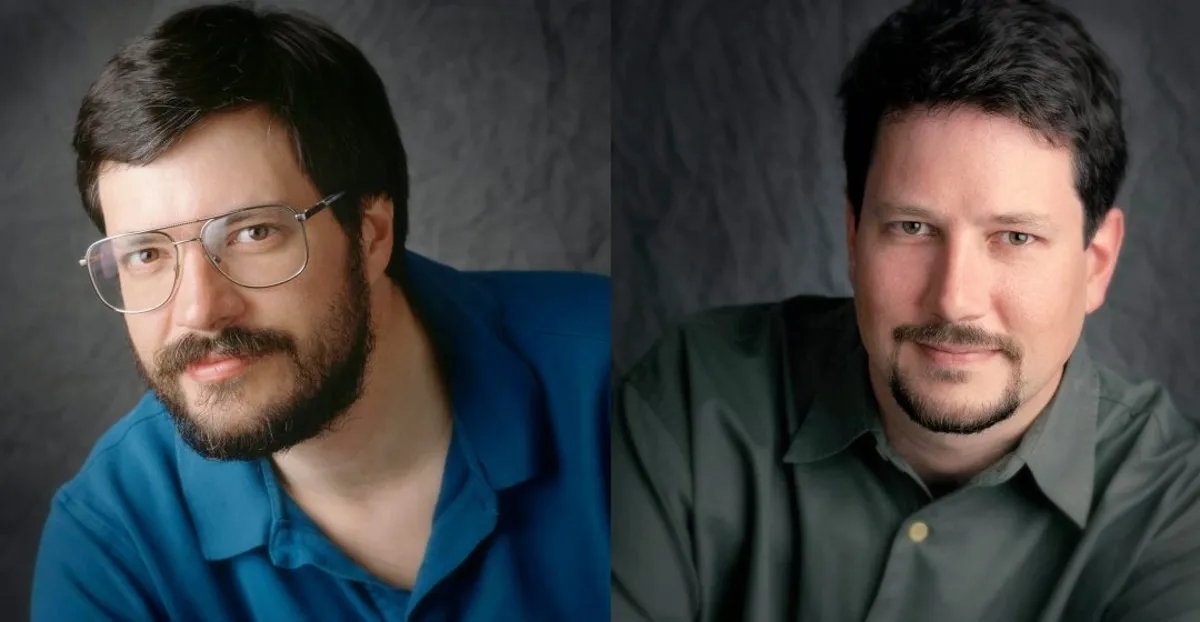
Early editions offered simple yet groundbreaking functions that allowed users to manipulate images without relying on elaborate darkroom procedures.
On March 31, 1995, Adobe bought the rights to Photoshop from the Knoll brothers.
Over time, each iteration introduced new features that refined how photographers adjusted exposure or merged multiple photos. Recent developments include more precise masking and faster selection methods, which I’ve enjoyed using to separate subjects from backgrounds with minimal fuss.
There’s also an emphasis on artificial intelligence, leading to notable improvements like facial retouching tools that reduce repetitive tasks. These additions embody Photoshop’s ongoing quest to retain its standing as a primary program for those who crave refined control over their visuals.
Adobe Photoshop Review

Key Features and Tools
Photoshop’s interface can appear complicated at first glance, with numerous panels and menus across the screen. Yet the workspace can be rearranged, which allows users to highlight the tools they use most.
Photographers can group color adjustments on one side and keep layers on the other. That personal layout strategy speeds up frequent tasks and reduces confusion. Selections remain fundamental, and it’s possible to refine edges so they blend naturally. Retouching features like the Healing Brush and Clone Stamp are handy for removing dust spots or smoothing out skin tones.
Adjustment layers make nondestructive editing achievable, allowing for quick changes in brightness or color without damaging the original photo.
The software’s advanced features bring AI-powered filters that can apply atmospheric effects or alter a portrait with minimal input.
Integration with Adobe Cloud means images and assets can be accessed from different devices, which is handy for those who travel or collaborate in real-time. Some teams even share projects to gather feedback on layered files. These capabilities underline why many professionals keep returning to Photoshop as their primary editing solution.

User Experience and Performance
The learning curve can be significant, so beginners might feel a little lost if they’re used to simpler apps. Countless online tutorials, written guides, and courses exist, though, which help break down the approach needed for tasks like compositing two images or modifying colors in specific areas.
Enthusiasts who commit to practicing typically see a steady improvement in their workflow. Speed and stability generally depend on hardware. Running Photoshop on a powerful computer with ample memory makes the overall experience more fluid. Large RAW files with extensive layers can push older setups to their limits, resulting in lag or slow rendering.
I’ve discovered that memorizing keyboard shortcuts greatly reduces the time spent clicking through menus. That helps with tasks like duplicating layers or transforming objects on the fly. Another factor that influences productivity is the ability to automate repetitive steps through actions or presets. That efficiency is especially important for portrait photographers who need to apply consistent edits to big batches of images.

Compatibility and Integrations
Adobe Creative Cloud programs work together seamlessly, allowing files to flow between apps like Illustrator, InDesign, or Lightroom Classic without troublesome import and export steps. This synergy is valuable for photographers who also dabble in layout projects or graphic design.
Outside the Adobe ecosystem, there are plugins (notice the plugins in the above photo) from third-party developers that further expand the software’s potential. Some plugins automate retouching steps, while others offer specialty looks or creative filters for stylized photos.
I find the best plugin that complements Photoshop and Lightroom Classic is Topaz Photo AI, as it has superior noise reduction, sharpening, and image upscaling. The PSD and TIFF file format preserves layers and masks, making it simple to revisit an older project if a client requests changes.
Photographers can then export finished work to formats like JPEG, TIFF, or PNG based on how they plan to share or print the files. This adaptability strengthens Photoshop’s place as a staple in numerous studios.
It can function as part of a larger workflow or stand on its own for more focused tasks. Those who need advanced integrations appreciate how it bridges different branches of digital production.
Pricing and Subscription Options
Adobe once sold perpetual licenses, but the company moved to a subscription model through the Creative Cloud—which stirred debate among users. Now, there’s a photography bundle that provides Photoshop and Lightroom under a single fee. I’ve found that bundle to be practical in the past because it gave me access to tools for both quick adjustments and more elaborate edits. I’m currently subscribed to the Adobe CC All Apps plan.
Those who want just Photoshop alone can pay for an individual subscription, though that cost might be higher in certain areas. Currently, the cheapest you can get Photoshop is $239.88 per year with the Adobe Photography Plan, which also includes both versions of Lightroom and 1TB of cloud storage.
Students and educators sometimes receive deals that make it more accessible. The subscription format remains a decisive factor for many photographers.
If you edit daily, the monthly expense can be justified as part of their operating costs. For casual hobbyists who only work on photos once in a while, the expense may feel unnecessary.
Each person needs to gauge how frequently they’ll use it. Some prefer one-time purchases from alternative editing programs, which might be simpler. Yet those alternatives may not match Photoshop’s depth.
Pros and Cons

The principal advantage lies in its expansive toolkit, which goes from classic color correction and retouching methods to advanced layering and specialized AI features. Professionals trust it for top-tier results in editing, compositing, and design. It also benefits from a global user community, which means solutions and tutorials can be found quickly.
Updates appear regularly, adding new capabilities that meet modern demands.
On the downside, the software’s complexity can feel like a barrier, especially if someone is just starting to explore photo editing. The subscription plan is another source of contention, as it can be a hurdle for those on strict budgets. High system requirements sometimes cause slow performance, forcing users to close other applications or upgrade hardware.
Remember, you can also create digital art and graphic designs using text with Photoshop, not just edit pictures.
Who Is Photoshop For?
Commercial photographers and graphic designers often depend on Photoshop to prepare images for clients or marketing campaigns. Many digital artists relish its flexibility for blending illustrations with photographs, creating hybrid art that can’t be done as easily in less specialized editors.
Photography enthusiasts with a passion for intricate edits might also appreciate its power. I was once a hobbyist who experimented with composites and discovered a whole universe of creative potential. For individuals who only need to crop images or adjust exposure in a straightforward manner, simpler programs like DxO PhotoLab or Luminar Neo will be more adequate. Even the poor man’s Photoshop: Photoshop Elements is an option. It’s a diluted version of Photoshop and can be purchased with a $100, three-year license.
Some photographers opt for the free GIMP or the $100 ON1 Photo RAW, which can handle many everyday tasks at a lower cost. Photoshop, however, tends to outperform these alternatives when it comes to the sheer range of editing functions. The question is how far a photographer aims to push their images and how flexible they want their setup to be.
Recommendations
This Photoshop review highlighted a program that has managed to evolve while preserving what made it so influential in the first place. Its vast selection of tools, compatibility with other Adobe apps, and ongoing updates have helped it stay at the forefront of image editing.
Those who feel ready to embrace its complexity will find it indispensable for producing refined photos or imaginative composites. Beginners might take time to adapt, so it helps to start with basic actions like spot removal or simple layer adjustments.
From there, exploring masks, advanced filters, and color-grading techniques becomes far less intimidating. I suggest you test the subscription with a free trial to see whether it aligns with their workflow.
It can be worth the investment for someone dedicated to professional-level results, but less frequent users might find it excessive. Adobe remains focused on refining the software, so there’s a good chance new improvements and AI-assisted features will keep appearing.
Final Thoughts
In my personal experience, Photoshop adds enough versatility to meet my creative needs, although it doesn’t come without its share of complexities and an ongoing cost. That combination of power and intricacy is what makes Photoshop the King of Photo Editing.
Adobe Photoshop

In this Photoshop review, I aim to explore its broad capabilities and examine why it remains a go-to choice in the design and photography worlds. Over the years, Adobe's flagship editor has developed a reputation for providing users with an array of tools that accommodate both basic and advanced techniques.
Product In-Stock: InStock
4.8