
In this tutorial, you’ll learn how to remove blemishes from your face using the Adobe Photoshop Express App.
The Photoshop App on Android and iOS is free; however, you need the premium version to use the retouching tools. You can get access to the premium version through the Adobe Photography Plan.
Blemishes that you’ll be able to remove in Photoshop Express:
- Acne
- Dark Spots
- Pimples
- Scars
How to Remove Blemishes from Your Face in PhotoShop Mobile

How to Remove Blemishes in Photoshop Express
Total time: 1 minute
Open a photo in Photoshop Express
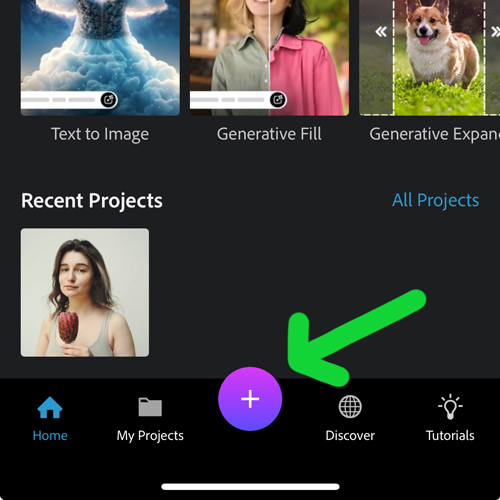
Use the import icon to choose a photo from your photo album.
Click on the heal tool
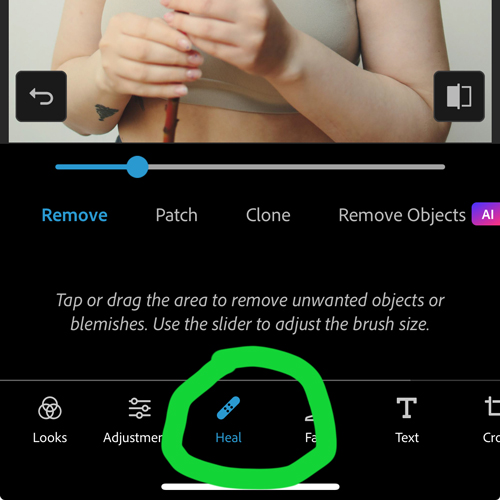
The heal tool in Photoshop Express is used to retouch portraits or remove objects from the background.
Pinch with two fingers and zoom in

For precision retouching of the face, pinch and zoom in with two fingers.
Brush over blemishes to get rid of them.

Make sure you have the remove brush selected. Change the brush size to a size slightly bigger than the blemishes. Use your finger and brush over the blemishes to get rid of them.
If you don’t like the result, you can brush over the blemish again or use the undo button.
Now, your face will be rid of blemishes.