

Last updated on November 3rd, 2025 at 12:23 pm
Bottom Line: PhotoLab excels at rendering RAW files and reducing noise with its DxO modules and DeepPRIME technologies, especially if you’re using a budget camera with a cropped sensor. Lightroom Classic, combined with Photoshop, excels at color grading, generative retouching, and photo manipulation.
Many amateur and professional photographers despise paying a subscription fee for photography software. Hence, many people avoid Adobe and seek a perpetual license, including many of my YouTube subscribers. In this guide, we’ll compare DxO PhotoLab 8 with Lightroom and Photoshop to determine which one is best for you.
By the way, I have been using each of these software programs for years.
Get 15% off DxO PhotoLab: use coupon code aperlust
The Main Differences at a Glance

Photoshop and Lightroom are part of the Adobe Creative Cloud and require a subscription, whereas PhotoLab doesn’t.
Lightroom Classic is one of the most comprehensive image management systems, and it uses its catalog-based library. If organizing, tagging, and sorting photos are top priorities, then Lightroom Classic is a better fit for you.
What Lightroom can’t do, Photoshop can with its advanced image manipulation tools through filters and layers. They complement each other. Photoshop requires a lot of time to learn.

Related: Lightroom vs Lightroom Classic
On the other hand, DxO PhotoLab uses its PhotoLibrary, which mimics your Windows Explorer or Mac Finder to cull through photos. DxO is known for its industry-leading optics modules, which means your RAW images will look better out of the camera without editing.

What Each Photography App Is in 2025
DxO PhotoLab 8 arrives with DeepPRIME 3 noise reduction, hue-range masks, and those famous optics modules. You buy it once, and then you can update it until the next paid version if you want; no recurring debit is charged to your card.

Lightroom exists as two desktop flavors. Classic keeps its catalog-centric heritage and, in version 14, adds Lens Blur, Adaptive Profiles, and HDR export. The cloud edition shares the same processing engine, but stores every original on Adobe’s servers, stripping away plug-ins and many professional workflow tricks.
Since you’re reading this guide, I recommend using Lightroom Classic over the newer cloud-based Lightroom.
Photoshop 2025 enters with Generative Fill, Generative Expand, and the brand-new Firefly Image 4 model that can fabricate entire scenes from a prompt. It also supports layers, filters, and advanced filters.
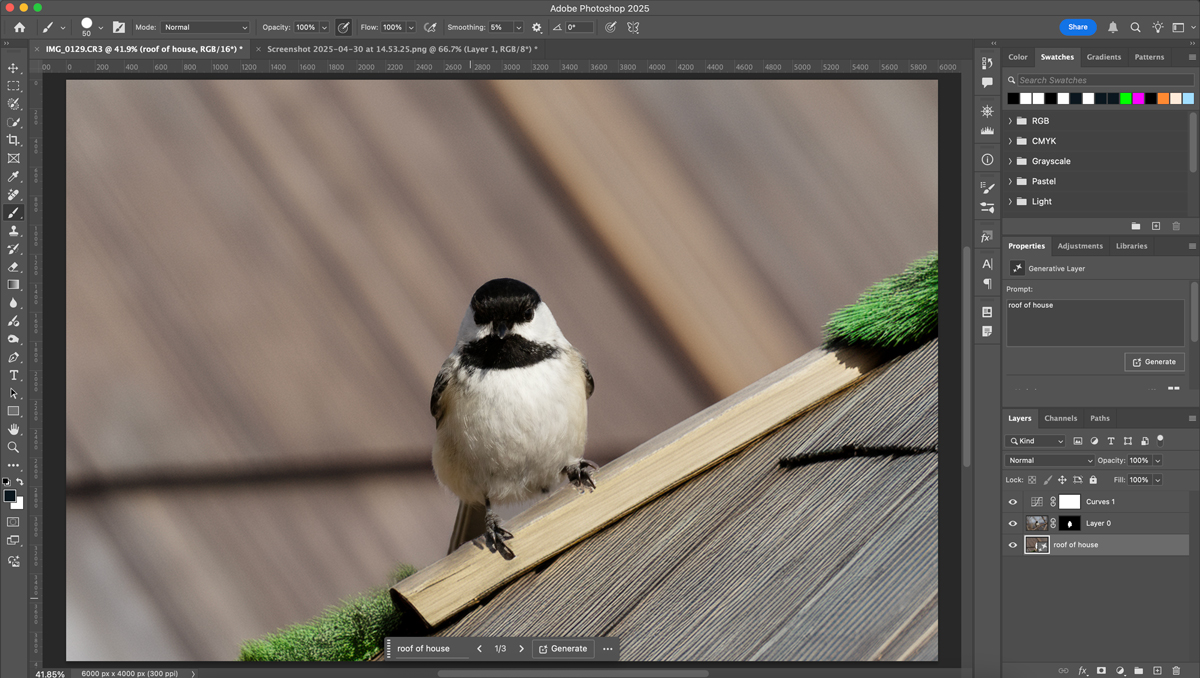
Graphic designers and artists also use Photoshop. Yes, you can draw art in Photoshop, even 3D rendering. However, I mainly use it for photo editing.
Why put them in the same cage? Because real-world editors constantly mix tools, overlap, but waste both time and hard drive space.
Noise vs Detail: The AI Denoising Smackdown

Push PhotoLab’s DeepPRIME 3 slider, and you claw back roughly three stops of ISO headroom without losing feather texture.
Lightroom Classic’s Denoise handles routine high-ISO work, yet preview renders feel slower, and the algorithm treats every lens the same. However, it does have AI noise reduction, which is superb but creates a separate DNG file.

Regarding RAW file demosaicing and noise reduction, I would give the nod to DxO PhotoLab over Lightroom because the former does a better job at recovering the shadows.
Camera Raw inside Photoshop uses the same math, so results match Classic, but they are presented behind an extra dialog. PhotoLab 8 will perform better than Lightroom and Photoshop for high-noise photos or photographers with beginner camera systems that don’t produce as sharp photos.
The takeaway is to pay once, wait shorter, keep details, or subscribe and queue a coffee while pixels churn.
Color & Tone Curves: Pushing Pixels Without Breaking Them

PhotoLab’s revamped curve offers a luma-only tweak, so you can deepen shadows without dragging saturation into odd territory.
Adaptive Profiles in Lightroom Classic give you an AI-generated starting point, and then Point Color nudges specific hues, broadens the strokes, and adds a swift finish.
Photoshop still rules complex composites—drop a sky, stretch borders with Generative Expand, and fine-tune every channel curve in separate adjustment layers.
Overall, the combination of Lightroom Classic plus Photoshop layers provides better color grading opportunities than PhotoLab.

Local Adjustments & Masking Workflows
U-Point control points in PhotoLab feel like painting with magnets: click, drag radius, adjust sliders, and done. There are no layers, no clutter—just a transparent mask underneath.
Lightroom Classic now recognizes subjects, skies, backgrounds, and even landscapes and stacks them inside a tidy masking panel.
Photoshop is the king of photo editing, especially for retouching photos and utilizing advanced filters and masks.
With AI masks and Photoshop layers, masking is easier with the Adobe photography software than DxO PhotoLab.
Repair, Remove, and Generative Magic
Erase a lamp post in PhotoLab with the Repair brush—fast yet traditional.
Lightroom Classic’s Generative Remove tool chews through context and guesses what was behind the pole, usually nailing the texture on the first pass. Photoshop’s prompt-based Generative Fill takes that further: type “convert to cobblestone plaza,” press enter, and watch pixels dream. Edge cases still require manual work, but the difference in creative capabilities is noticeable.
Generative retouching is a big deal, and it helps clean up photos much faster. Lightroom and Photoshop’s generative retouching still lead the industry, whereas PhotoLan does not yet offer generative retouching.
File Management & Ecosystem Fit
PhotoLab stores edits in tiny .dop sidecars beside every RAW. Lose the database? The corrections remain intact. Lightroom Classic locks adjustments inside a catalog file; backups are simple but mandatory, and the database grows quickly.
Photoshop can sidestep both, yet sprawling PSD or PSB documents invite their own archiving rituals. Round-tripping is smooth: PhotoLab sends a linear DNG or TIFF to Photoshop, you add layers to taste, save, and the updated version pops back into the browser you started from.
Price, Licensing & Update Cadence
The PhotoLab 8 Elite license costs $230 and carries a lifetime key. Adobe’s Photography Plan wraps Lightroom (both versions) plus Photoshop, costs $240 per year, rolling out new toys whenever the engineers push code. You can also opt for just Lightroom and pay $120 per year.
Subscription math looks gentle per bill, but after two years of the Lightroom-only plan, you’ve paid more than PhotoLab’s sticker price, and you continue to pay to stay current.
Optics, Phones, and a Note on Mobile Gaps
DxO’s optics modules, DeepPRIME noise reduction, and lens sharpness optimization technologies render a better RAW image than Adobe Camera RAW, which powers Lightroom and Photoshop’s RAW file handling.
Yet DxO PhotoLab doesn’t support the latest Apple or Android camera phones. This is a significant downside for travel and mobile photographers. Adobe, in contrast, welcomes smartphone shooters with automatic lens profiles and cloud sync.
Final Thoughts: “Pick Your Personality, Not Just Your Pixel Count”
If subscription fatigue keeps you up at night and optical precision ranks higher than novelty, PhotoLab 8 deserves a lengthy trial. High-noise wildlife, decade-old DSLRs, and even a second-hand kit lens—DeepPRIME cleans them with ease.
Lightroom Classic excels at managing extensive catalogs, rapid culling, and steady export pipelines. The cloud sibling, on the other hand, lets you share edits across devices with minimal fuss.
Photoshop closes gaps that neither program tackles, from frequency-separation portrait work to prompt-based scene building.