

Last updated on January 16th, 2025 at 12:03 am
Masking in photography can sometimes be a time-consuming task in photo editing. Topaz Labs has created Mask AI to make the masking process faster. This Topaz Mask AI review will give you a quick run-through of the software.
Follow this link and use coupon code aperlust for a 15% discount off Mask AI.
My Topaz Mask AI Review and Thoughts
First of all, Topaz Labs had a similar masking application called Topaz ReMask. I feel Topaz ReMask and Mask AI are pretty much the same software. So, if you were planning to upgrade from ReMask to Mask AI, I don’t think it would be worth the upgrade.
Now getting back to the newer photography masking software.
How Mask AI Works
The masking process works by using three different colored brushes:
- Green – areas that you want to keep
- Red – areas that you want to cut
- Blue – areas you want Mask AI to calculate
With the green, red, and blue brushes, you tell Mask AI which parts of the image you want to keep and remove. You’ll be painting a trimap.
The way I brush the mask is by first using the blue brush and adjusting the brush to a size that makes painting along the edge of the required mask easy.
After I have a good blue brush size, I paint the parts of the image where I want Mask AI to compute the mask for me. In other words, the blue painted area is the difficult part of the image to create a precise mask, therefore making Mask AI do the artificial intelligence process when I’m done painting. The blue brush is used for edge detection.
After finishing with the blue brush, I’ll use the green and red brushes to paint the areas I want to keep and remove.
If there is a large area that requires all green or red paint, then you can use the green or red fill buckets. These are like brushes but with one click on the image it’ll paint everything the color you choose. It’ll stop at the edge of another brush color.
With the below image of the woman, I first used the blue brush to paint along her body and hair.
I then used the green and red fill buckets to quickly paint the inside of the blue outline green, and outside red.
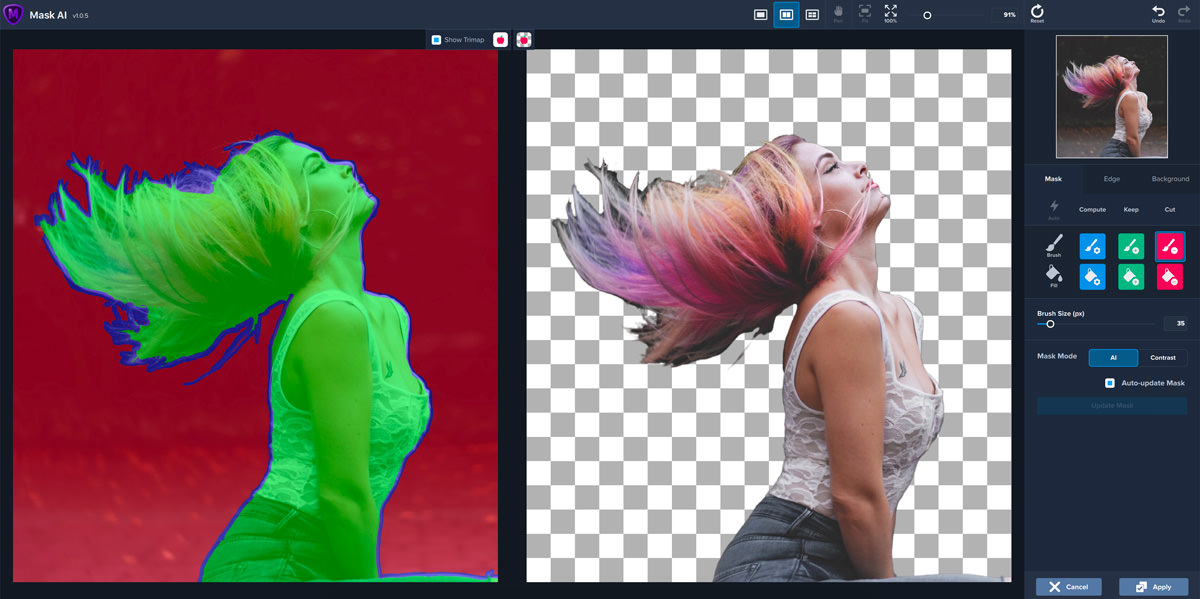
For more complex masks, such as portraits with hair sticking out or trees with a sky view between the branches, you need to refine the mask by making small brush strokes/spots in areas you want to keep and cut.
I’m not sure how much artificial intelligence Topaz Mask AI has. The term AI is used loosely and comes off as a marketing strategy.
After painting with the tricolor brushes, you just press the compute mask button. Mask AI will now calculate the mask.
Once the mask is produced, you can further edit it with the brushes plus shift and harden (sharpen) the mask.
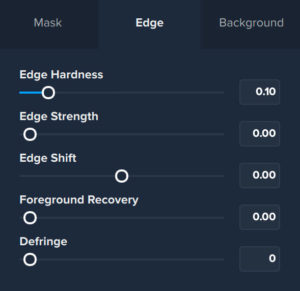
I used a difficult image to mask: a girl with her hair flying out.
Below is the result of my mask without spending too much time on it. As you can see, Mask AI is not perfect. Even if I spent more time on the mask, it would have been counterproductive as hair is not easy to mask even with automation software.
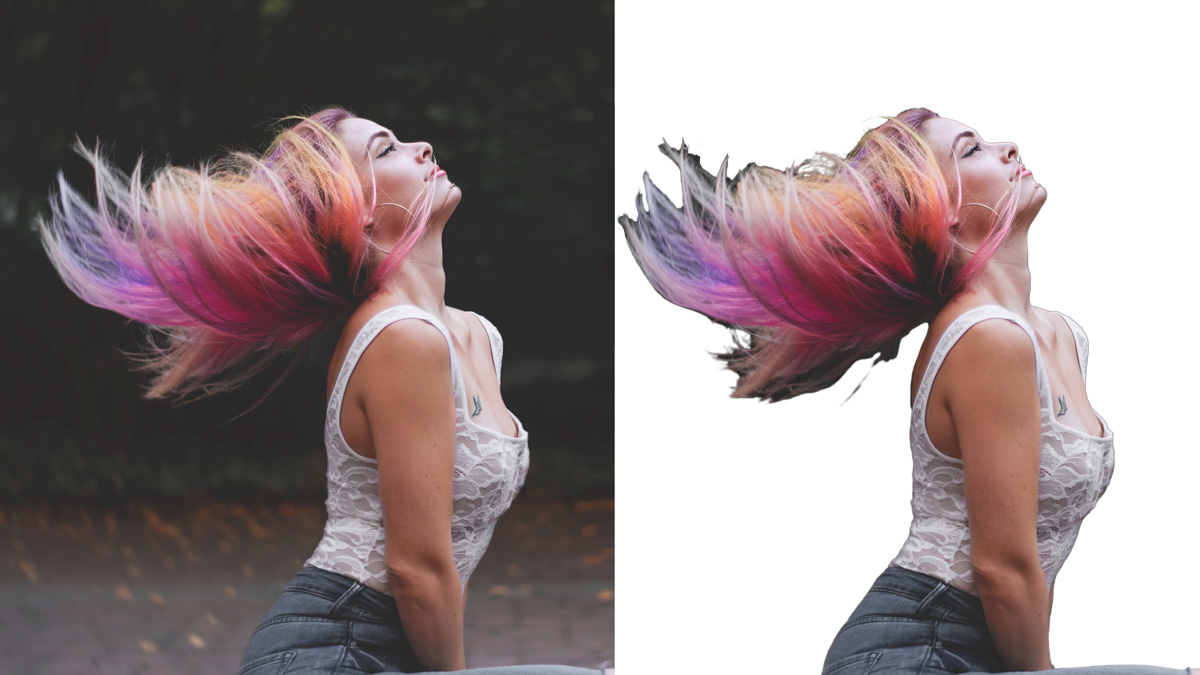
In order to do a better job at masking the above photo, you would need to take it into Photoshop and use the blend modes.
There is also an auto detect sky mask tool to make masking easier. It saves some time. On the other hand, if you really want to mask the sky and replace it with something else, then you should read about Luminar’s AI Sky Replacement and AI Augmented Sky technologies.
Price
Mask AI costs $99.99. You can follow this link and use coupon code aperlust for a 15% discount.
System Requirements
| Requirements | Windows | Mac |
| OS Version | 7, 8, 10 64-bit only | macOS 10.12+ |
| minimum display size | 1024 x 768 pixels | 1024 x 768 pixels |
| OpenGL support level | Open GL 3.3 or later | Open GL 3.3 or later |
| CPU | Intel | AMD |
| minimum | Intel i5 or equivalent (3.0GHz and above) | Ryzen 5 or equivalent (3.0GHz and above) |
| recommended | Intel i7 or greater (4GHz and above) | Ryzen 7 or greater (4GHz and above) |
| GPU | Nvidia | AMD |
| minimum | 2GB of dedicated VRAM (GT 740 or greater) | 2GB of dedicated VRAM (Radeon 5870 or greater) |
| recommended | 4GB of dedicated VRAM (GTX 970 or greater) | 4GB of dedicated VRAM (Radeon RX 460 or greater) |
| optimal | 8GB of dedicated VRAM (GTX 1080 or greater) | 8GB of dedicated VRAM (Radeon RX 580 or greater) |
Mask AI does not support Intel HD Graphics 4600 or lower.
A minimum RAM of 8 GB is required. 16 GB is recommended and 32 GB is optimal.
Internet connection is required to log into the software.
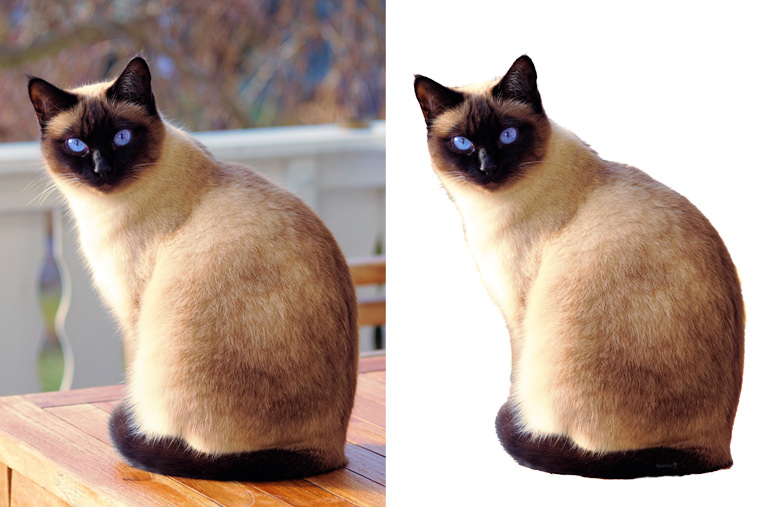
Amazingly, Mask AI did a pretty good job with the cat image below. You may not notice it because of the white background, but the whiskers were masked well. I didn’t even bother fine tuning the trimap in this example.
Conclusion
Topaz Mask AI will easily mask high-contrast images that don’t have multiple fine or thin details.
But the application is expensive considering it only accomplishes one process of the photography workflow.
But I only recommend Mask AI if you don’t use Photoshop for masking. Interestingly, it can be used as a Photoshop plugin but not for Lightroom or Capture One.
I bought it, but frankly prefer the old non-AI version they called Remask.
I have several of the Topaz products. I was disappointed with Mask AI and would not recommend it. I used it to remove a solid color background from portraits and it always left a fringe around the edge of the subject. Using the edge adjustment to remove the fringe made the subject look weird. I contacted tech support and they were unable to make it work as I had hoped. Frankly, it would have been less time consuming had I used the background eraser in Photoshop.
I have since learned about remove.bg. They offer a free trial on an image that you upload. I was sold and purchased it. You commit to a certain number each month and the unused removals are added to the next month.
Hi My compute mask stos at 11 % and my automatic sky removal do NOT worlk
Topaz Mask AI is disappointing. The point of such a product is that it should work well where it’s very hard to isolate an object such as the image of the woman in your article. Mask AI does a poor job of it. Topas has not upgraded it in ages, so my assumption is they don’t think it’s much good either and can’t see a way to make a big improvement. I cannot recommend it.